March 2026: What’s new in AntsRoute?
Blog > Product updates > March 2026: What’s new in AntsRoute?
March 2026: What’s new in AntsRoute?
Published on 24 March 2026 • Reading time: 7 min read
Our team continues to enhance AntsRoute to provide you with a tool that is increasingly efficient and better suited to the realities of your field operations.
This month, several improvements have been introduced to enhance planning, job tracking, and communication with your teams and customers.
On the agenda: more precise absence management, new filtering and configuration options, and enhancements designed to simplify the work of your field teams.
These updates are part of our ongoing commitment to help you optimize your routes, improve operational reliability, and enhance your quality of service.
Table of contents:
- Add recurring absences
- Search availability across up to 24 time slots
- Add up to 10 attachments per job
- Filter jobs by capacity
- Job tracking : view completion and cancellation comments and reasons
- Include completion and cancellation comments and reasons in your customer notifications
- Scan multiple barcodes faster when validating a job

Add recurring absences
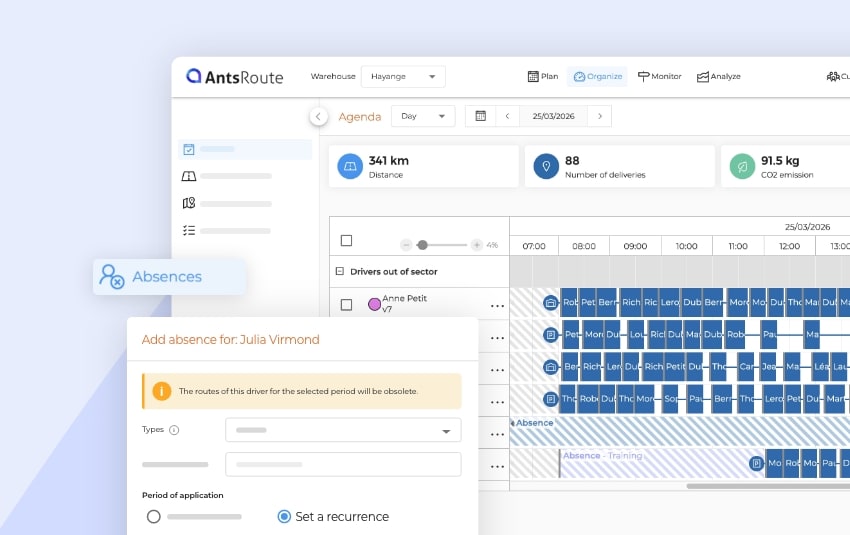
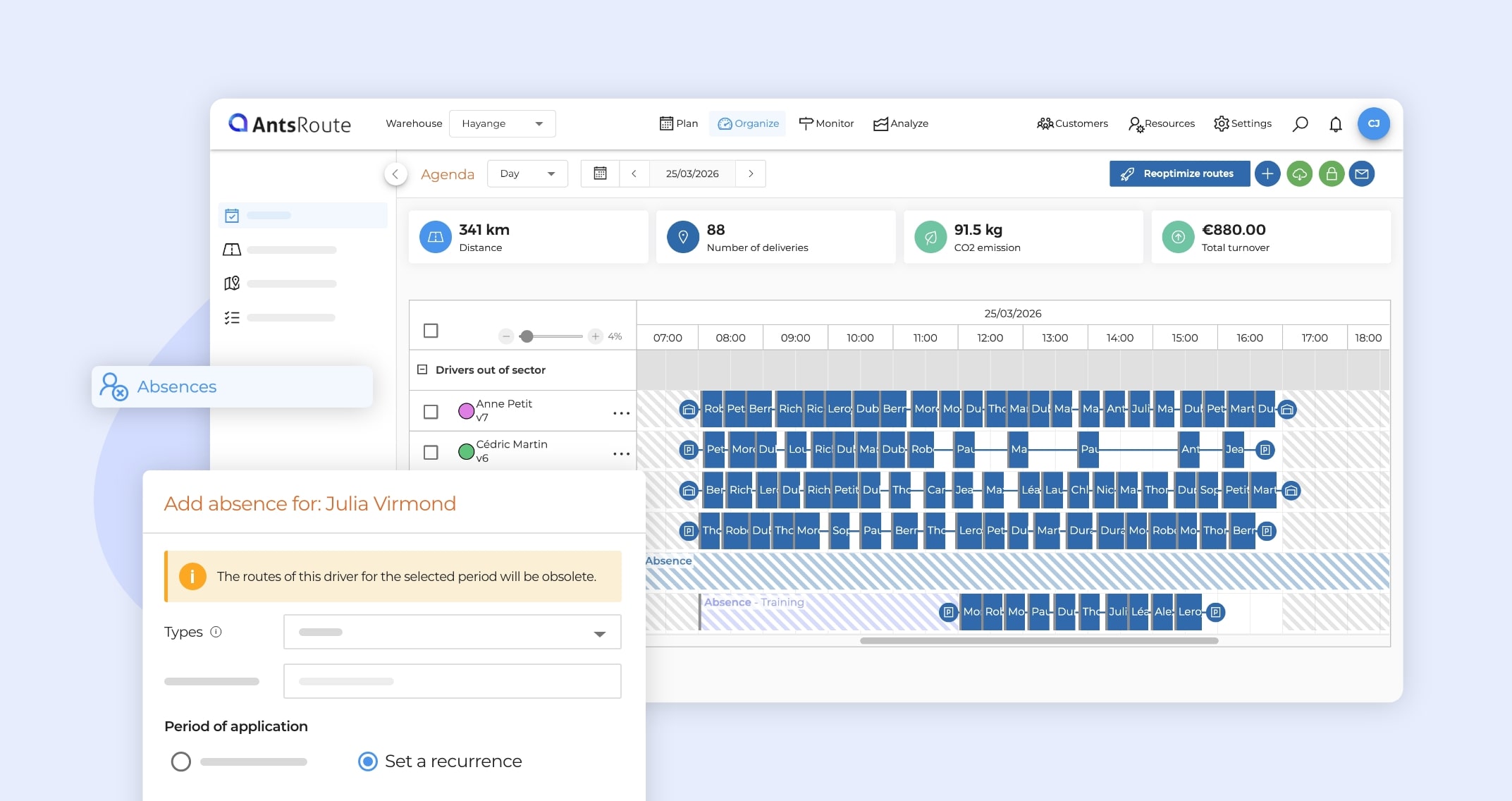
AntsRoute now allows you to define recurring absences for your field agents. This enhancement makes it easier to manage repeated unavailability over time, while improving the accuracy of your planning.
A recurring absence is an unavailability that automatically repeats based on a defined frequency (for example: a meeting every Monday morning).
More reliable planning
By integrating these absences directly into your schedule, you can:
- avoid assigning jobs to unavailable agents,
- reduce last-minute adjustments,
- better account for the real constraints of your teams.
This feature aligns with AntsRoute’s optimization approach, which takes into account all operational constraints (working hours, skills, availability, etc.) to generate consistent and feasible routes.
Practical use cases
Recurring absences are particularly useful for planning regular events, such as:
- a weekly team meeting every Monday morning,
- a monthly training session,
- an agent unavailable two Wednesday afternoons per month.
These unavailabilities are automatically taken into account during route planning and optimization.
How to define a recurring absence
To configure an absence that repeats automatically:
- Open the agent’s profile
- Go to Absences > Add an absence
- Select “Set recurrence” in the Period of application field.
- Configure the recurrence settings:
- Starts on: choose the start date
- Ends:
- on: set an end date,
- after: define a number of occurrences,
- no end date: the absence repeats indefinitely
- Frequency:
- daily,
- weekly,
- monthly.
- If the absence does not cover the entire day:
- Uncheck “All day”,
- specify a start and/or end time.
- Click “Save”
Better consideration of field constraints
Once configured, these absences are automatically integrated into your planning processes. AntsRoute ensures that no jobs are assigned during these time slots.
➡️ To learn more about absence management, check out our support article.
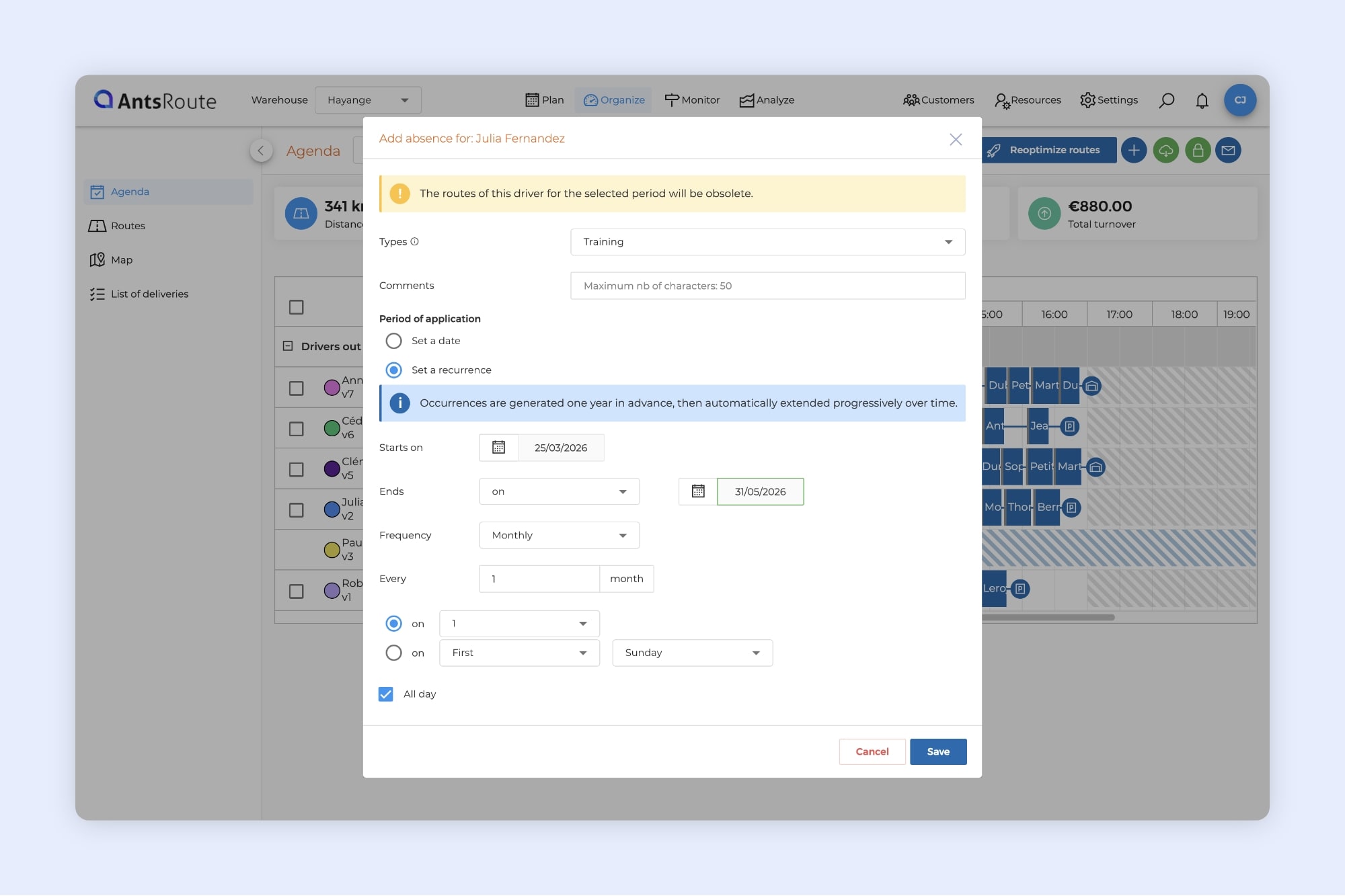
Adding a recurring absence on AntsRoute.
Search availability across up to 24 time slots
An evolution of the feature introduced last month
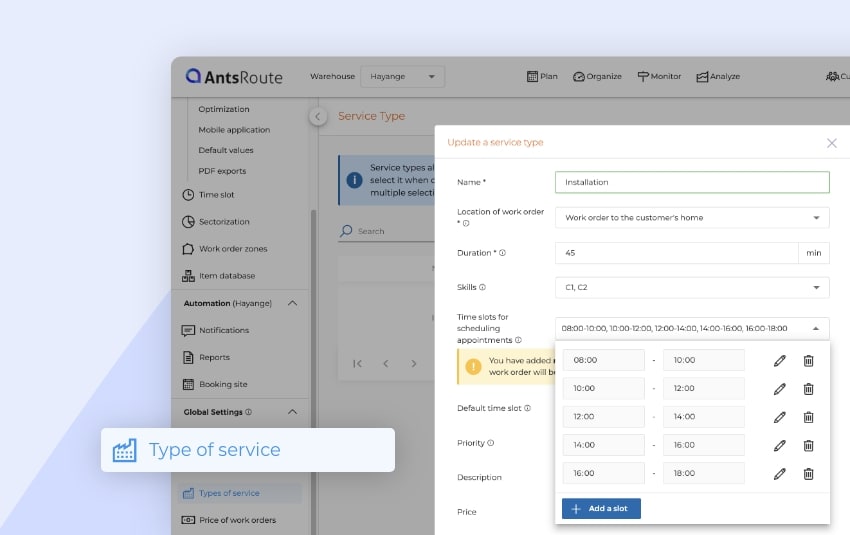
Last month, AntsRoute allowed you to configure up to 12 time slots per service type.
We are now going even further with the ability to define up to 24 time slots.
This enhancement gives you even more precise control over your availability and is well suited for organizations that require highly granular time windows.
More flexibility for your planning
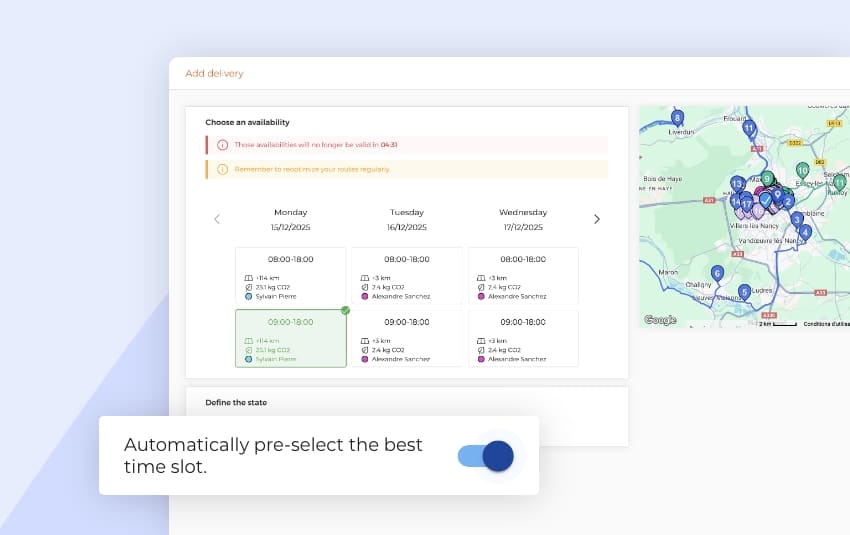
When scheduling a job or delivery, AntsRoute displays availability based on the time slots defined in the selected service type.
With more time slots, you can:
- offer more precise time slots to your customers,
- increase the chances of finding a compatible slot,
- optimize your routes more accurately.
For example, you can now define highly granular time slots (30 minutes or less) throughout the day.
Easy setup from Service Type
To use this feature:
- Go to Settings
- Open the Service Types tab
- Add or edit a service type
- Configure up to 24 time slots
- Click Save
These time slots are then automatically used during scheduling.
Important: impact on availability display
To ensure optimal performance, the availability display adapts based on the number of configured time slots:
- Up to 4 time slots → availability displayed over 3 days
- 5 to 12 time slots → availability displayed over 2 days
- 13 to 24 time slots → availability displayed over 1 day
This approach ensures fast and smooth availability searches, even with a large number of time slots.
➡️ To learn more, check out our support article.
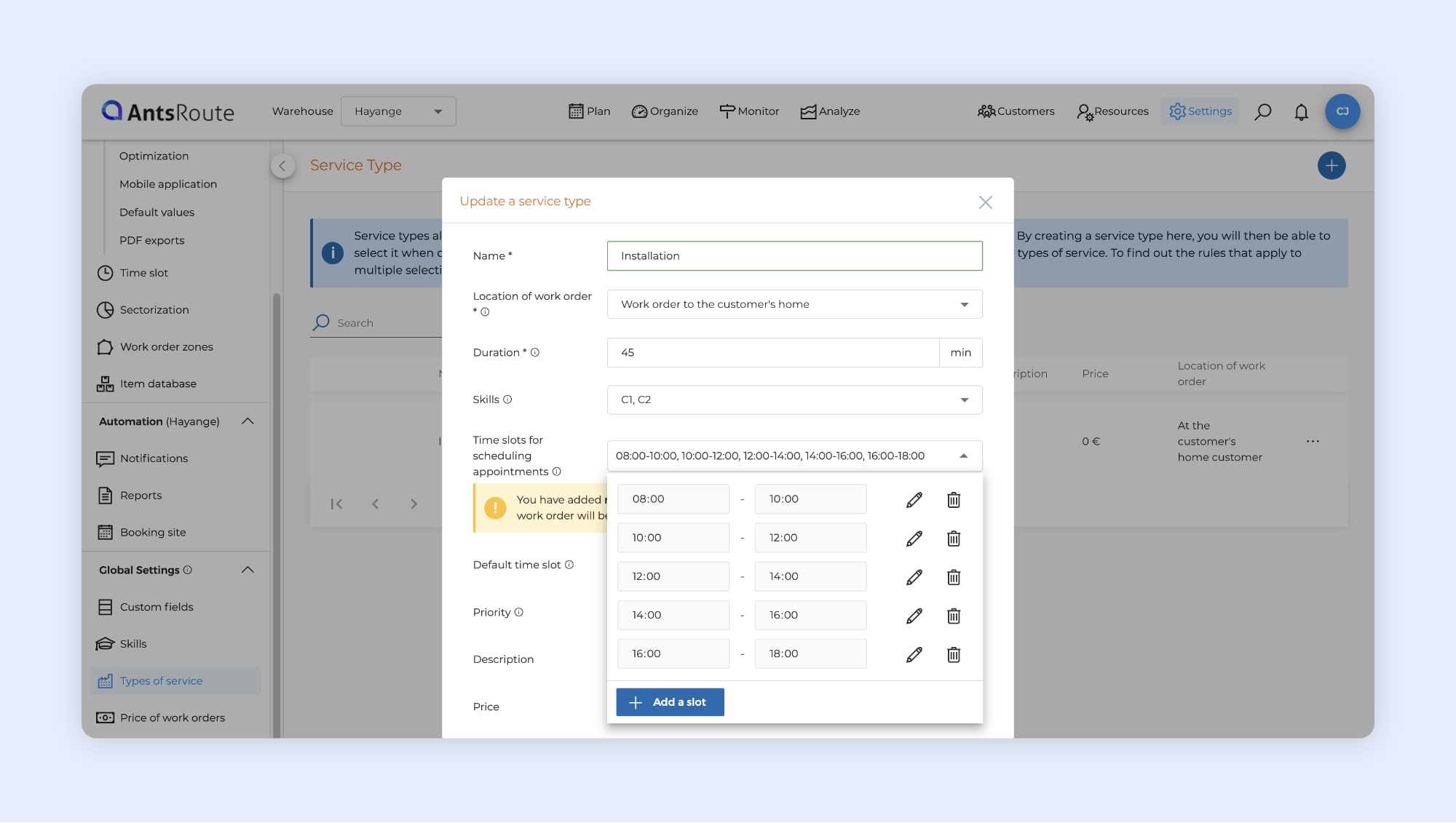
The creation of a service type with 24 time slots.
Add up to 10 attachments per job
AntsRoute enhances attachment management when planning a job. You can now add up to 10 files per job, compared to 3 previously.
Better preparation of jobs
This enhancement allows you to share more useful information with your field teams, directly from AntsRoute.
For example, you can:
- attach technical documents or procedures,
- add photos related to the job,
- share customer files (purchase orders, plans, etc.).
Centralized and accessible information
Attachments added to a job are accessible to field teams, especially via the mobile app.
This allows you to:
- reduce communication outside the platform (emails, messages, etc.),
- ensure agents have the right information at the right time,
- improve the quality of job execution.
Same workflow, more flexibility
The way attachments are added remains unchanged. You can simply add more files as needed when creating or editing a job.
☝️ Good to know: more improvements related to attachment management are coming soon.
➡️ To learn more about attachment management, check out our support article.
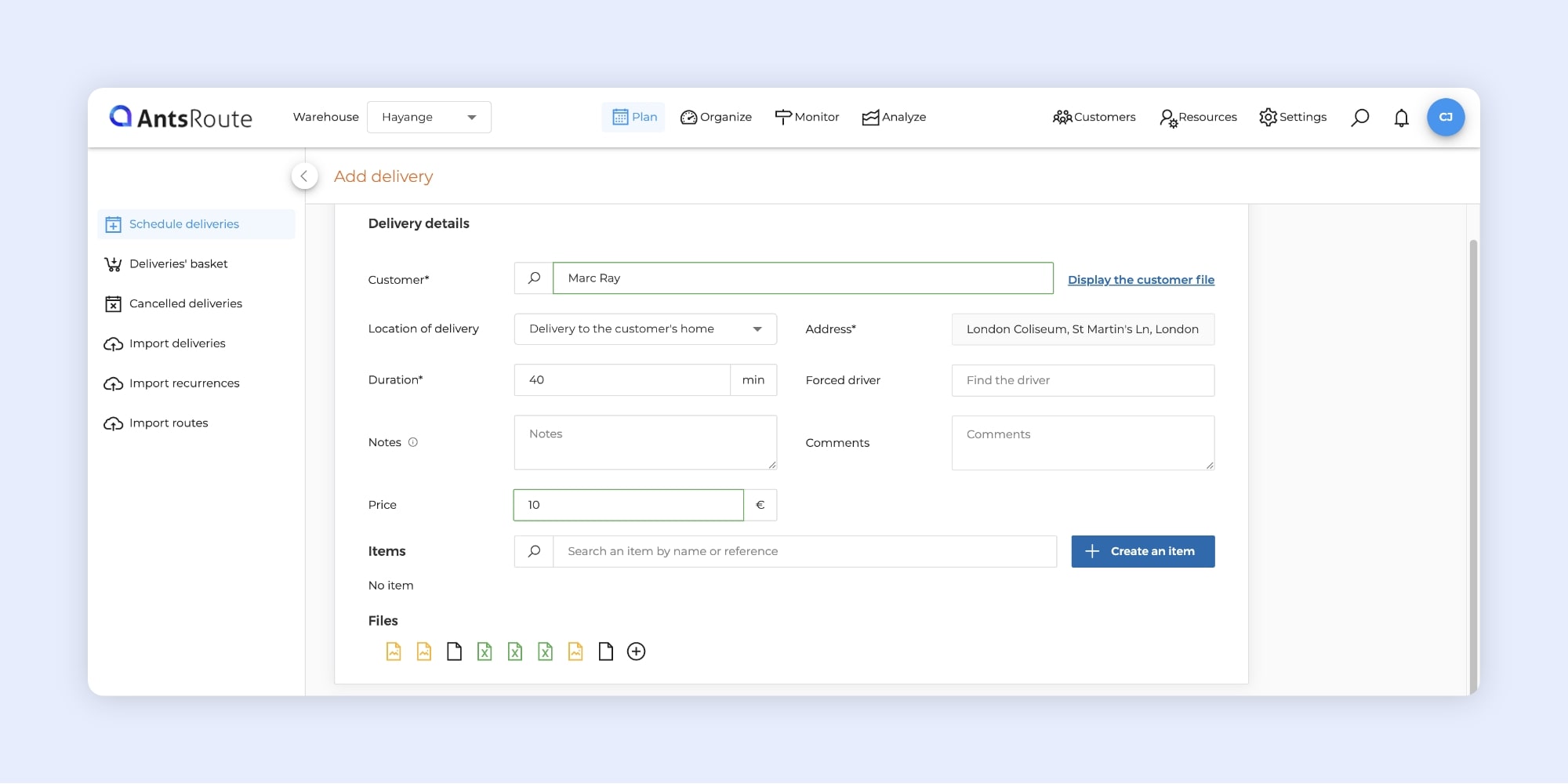
Adding attachments when scheduling a job.
Filter jobs by capacity
AntsRoute enhances its filtering capabilities with a new criterion: capacities. You can now filter jobs based on the quantities to be delivered, directly from your interface tables.
This enhancement is particularly useful if you use the Capacity feature, which allows you to define vehicle capacities and the quantities associated with each job.
Filters help you focus only on relevant jobs. With this new criterion, you can, for example:
- display only jobs with a high delivery volume,
- more easily analyze specific categories of jobs based on their load.
A concrete example
For example, you can filter your table to display only:
- jobs where the delivery volume is greater than 10 liters,
- or those where the weight is less than 5 kg.
Filtering directly available in your tables
Like other filters in AntsRoute, this new criterion can be used directly from your job tables.
For example, from Organize > List of deliveries:
- Click Filter
- Select your capacity (e.g. volume, weight, pallets, etc.)
- Choose the condition and value to display
- Click Apply
➡️ To learn more about using filters, check out our support article.
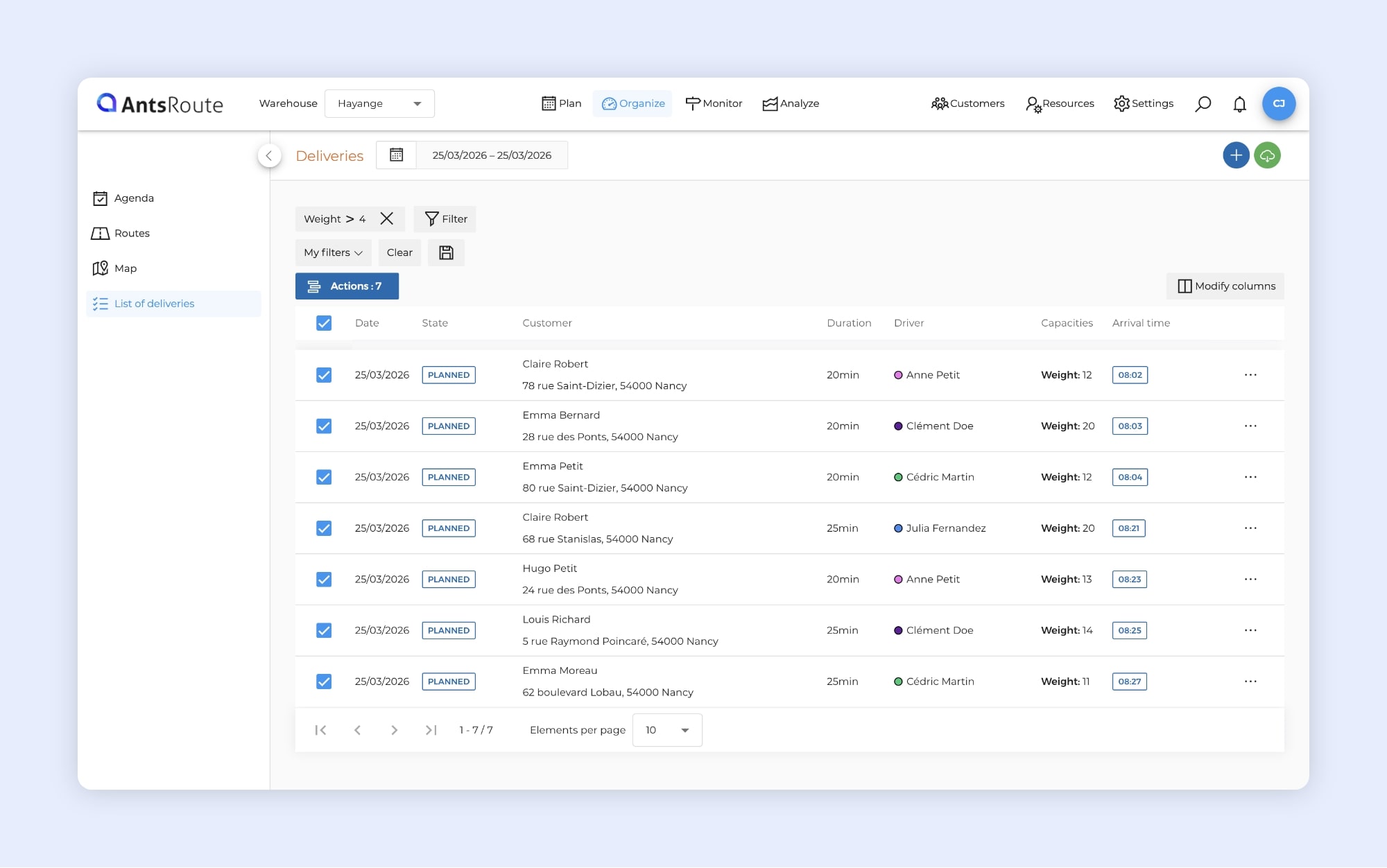
Filtering jobs based on “Weight” capacity in AntsRoute.
Job tracking: view completion and cancellation comments and reasons
AntsRoute enhances the Monitor > List of deliveries tab with the display of completion comments, cancellation comments, and cancellation reasons.
These details, entered by field agents from the mobile app, are now directly accessible in your tables.
To display these fields in your table:
- Click “Modify columns”
- Check Resolution / cancel comments and Cancellation reasons
You can then customize your view and quickly access key information.
☝️ Reminder: cancellation reasons must be configured beforehand in Settings > Cancellation reasons (e.g. customer absent, address not found).
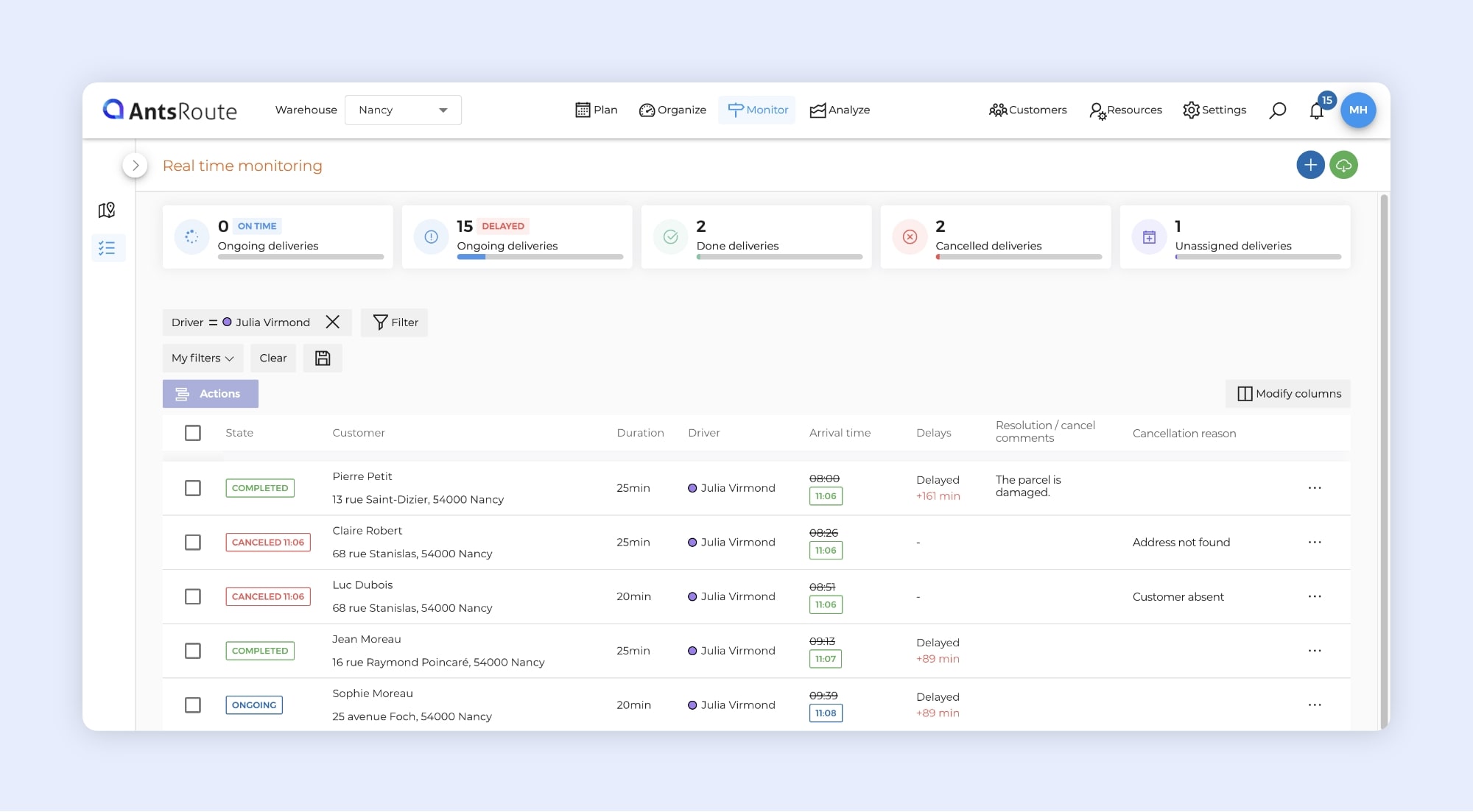
Viewing completion comments and cancellation reasons in the Monitor module.
Include completion comments and cancellation reasons in your customer notifications
AntsRoute now allows you to use resolution / cancel comments and cancellation reason variables in your customer notification templates.
This enables you to automatically share accurate, field-based information directly in your messages.
As a reminder:
- resolution and cancel comments are entered by agents when validating or canceling a job from the mobile app,
- cancellation reasons must be configured beforehand in Settings > Cancellation reasons (e.g. customer absent, address not found).
Where can these variables be used?
Resolution / cancel comments:
- Manual notification from AntsRoute
- Manual notification from the mobile app
- Automatic notification after delivery completion
- Automatic notification after delivery cancellation
Cancellation reasons:
- Manual notification from AntsRoute
- Manual notification from the mobile app
- Automatic notification after delivery cancellation
These variables are available when creating or editing your notification templates. Simply insert them into your messages to automatically enrich your customer communications.
Scan multiple barcodes faster when validating a job
AntsRoute improves barcode scanning when validating a job. Drivers can now scan multiple barcodes in sequence, without having to restart the action after each scan.
Save time in the field with sequential scanning
Previously, it was necessary to click again on “Scan a barcode” after each scan. Now, a sequential scanning system allows continuous scanning without interruption.
Other updates and improvements
- Improved user interface for managing agents’ working hours: a clearer and more intuitive setup to define your teams’ availability.
Have questions? Our support team is available via chat in your AntsRoute account or by email.
WRITTEN BY

Marie Henrion
At AntsRoute, Marie has been the marketing manager since 2018. With a focus on last-mile logistics, she produces content that simplifies complex topics such as route optimization, the ecological transition, and customer satisfaction.
Optimise your Routes Today
Free 7-day trial | No credit card required
Contenu
- Add recurring absences
- More reliable planning
- Practical use cases
- How to define a recurring absence
- Better consideration of field constraints
- Search availability across up to 24 time slots
- An evolution of the feature introduced last month
- More flexibility for your planning
- Easy setup from Service Type
- Important: impact on availability display
- Add up to 10 attachments per job
- Better preparation of jobs
- Centralized and accessible information
- Same workflow, more flexibility
- Filter jobs by capacity
- Filtering directly available in your tables
- Job tracking: view completion and cancellation comments and reasons
- Include completion comments and cancellation reasons in your customer notifications
- Where can these variables be used?
- Scan multiple barcodes faster when validating a job
- Save time in the field with sequential scanning
- Other updates and improvements
- Optimise your Routes Today